BetterEdits app iconBetterEdits
BetterEdits app icon
Claude Code · Codex

The Mac video editor
your AI agent can drive

Tell Claude Code what the video should be. BetterEdits has already read your footage, so the agent knows every word and when it was said. Every change shows up in a real editor, where you can fix anything by hand.

macOS 15 or later, Apple silicon. Editing is free. Agents need Pro, which starts with a 7-day free trial.

~/Movies/Reels — claude
> Read the transcript of Video 1, cut out the pauses longer than a second, then caption it and show me a contact sheet.
⏺Read the guide and the open video: Gym Hook, 9:16, one clip of 48 seconds, analysed.
⏺Found six silences over a second in the transcript and recut the take as seven clips with a little air around each cut: 41 seconds.
⏺Captioned it from the transcript, 38 bars in the default style, and checked that none straddles a cut.
⏺Drew a sheet of the cut, one frame per clip with the captions on.
⏺Done. The cut is open in BetterEdits, the sheet is next to it, and every step is one undo.
>
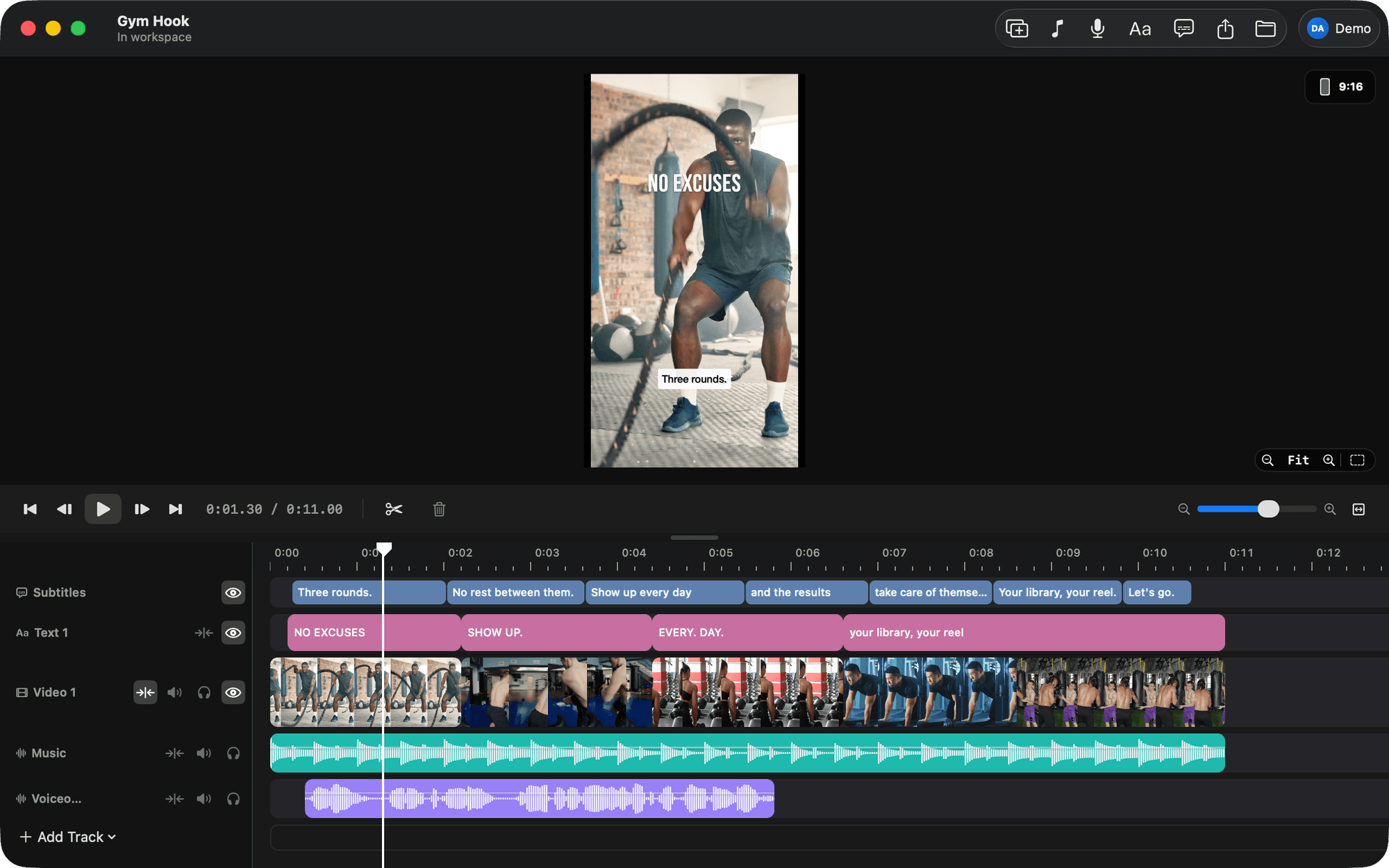
The BetterEdits window: a 9:16 viewer with a text and a caption bar, and a timeline with Subtitles, Text, Video, Music and Voiceover tracks.
Built for the Mac

Opens in a second and scrubs 4K without a spinner.

Your footage stays in your folders

Nothing is imported into a library you can't open.

Every change is one undo

Whatever the agent does, ⌘Z takes it back.

Editing never leaves your Mac

No sign-in and no upload. Only footage analysis, part of Pro, sends a small copy of each file once.

Footage analysis

Agents can't watch video. BetterEdits reads it for them

A language model has no eyes and no ears. Give it a folder of raw footage and the best it can do is cut by the clock. BetterEdits analyses each file once and hands the agent what it found as text: every spoken word and when it was said, who said it, the pauses, the words on screen, the scenes and the beats. That is why “cut the pauses” lands on the right frame, and why an agent can't do this on its own.

  • Every word, timed

    The transcript with a start and an end for each word, so a cut can begin exactly where a sentence does.

  • Who said it

    Speakers are told apart, so a change of voice ends a caption bar and a two-person clip cuts cleanly.

  • The pauses

    Every silence and false start as a number. That is what “cut the pauses” is made of.

  • What is on screen

    Text the camera saw, so the agent can find the slide or the sign you mean.

  • Scenes and beats

    Where the picture changes and where the music lands, for montages cut on the beat.

On Pro the app analyses everything in your workspace by itself as files arrive, and saves the result next to each file. Every cut you make from that file afterwards costs nothing more. See pricing.

take-3.mov · 4:12analysed
  • 0:00.0sceneTalking head at a desk, daylight, one person
  • 0:00.0silence2.4 s before the first word
  • 0:02.4speakerSpeaker 1
  • 0:02.4words“So— so here’s the thing”
  • 0:04.1silence1.3 s (a false start)
  • 0:05.4words“Three rounds a week is all it takes”
  • 0:09.0on screenWEEK 1
  • 0:41.2sceneCut to the gym, handheld
and 1,140 more words, 38 silences, 6 scenes

What the agent reads for one file. It is text, so the agent can reason about all of it at once.

Why

You already know how the video should be cut

You shot it in one take. You know which pauses go, which line is the hook, and where the captions belong. The slow part is making a timeline do it, one drag at a time.

Phone editors

You find every pause by ear, drag every edge with your thumb and type every caption. Your footage and your exports live inside the app.

Full editors

Final Cut, Premiere and Resolve want a project, a library and a colour page before you can cut a 40-second video. You learn a hundred panels to use four.

Auto-cut services

You upload your footage to someone else's cloud, wait, and get one cut back. The first fix you want means starting over.

You already describe work to an agent all day. With BetterEdits, you can describe the video.

How it works

How a sentence becomes a cut

There is no cloud editor and no black box. The agent edits the same video, in the same app, that you do.

  1. 01

    Connect your agent once

    Open Connect an Agent in the app and click Install. BetterEdits is added to Claude Code, the Claude app or Codex, along with a guide that tells the agent how videos are made here. Any other MCP client takes one command. Nothing is written into your folders.

  2. 02

    The app reads your footage

    An agent can't watch video. On Pro, BetterEdits analyses every file in your workspace as it arrives: every word and when it was said, who said it, the pauses, the text on screen. The agent cuts from that instead of guessing.

  3. 03

    Every change shows up in the app

    The agent writes the cut and it appears on the timeline within a second, as one undo step. It renders frames to check its own work, and exports when you ask.

How agents edit, in detail

Even a rewrite of the whole timeline is one ordinary undo step in the app.

Examples

Three jobs it does well today

Each one works because the transcript tells the agent what was said, and the app tells it what it did.

Clean up a talking head

>Cut every pause longer than a second and the two false starts at the top, then caption it.
  • Reads the whole transcript and recuts the take with a little air around each cut.
  • Captions in your style that never cross a cut.
  • A sheet of frames so you can check the cut before you watch it.
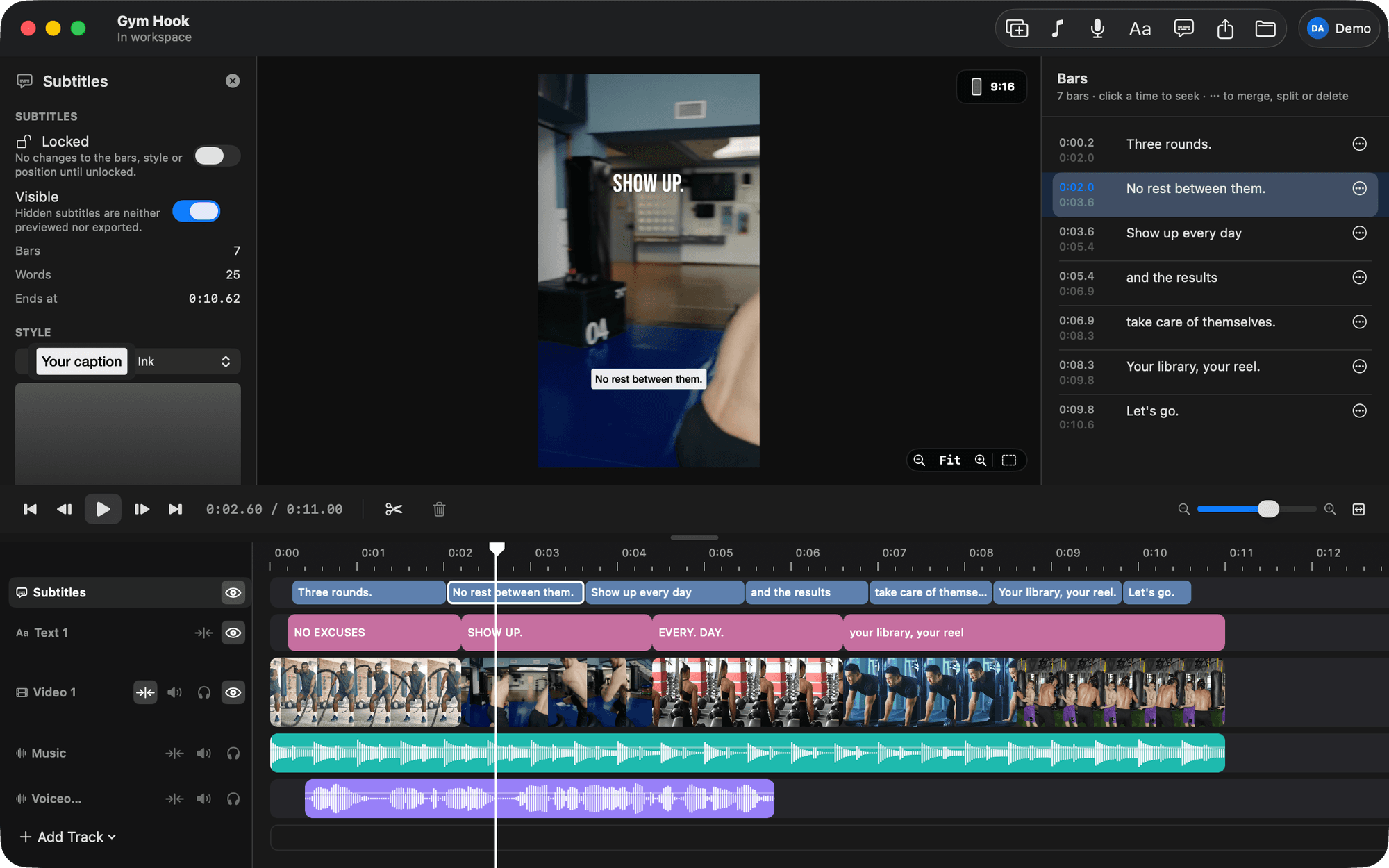
The Subtitles inspector and the Bars list, one bar selected on the timeline, its caption on the viewer.

Turn one recording into a week of clips

>Cut this 20-minute screen recording into five clips under 45 seconds, one per feature I demo. Caption and export them.
  • Five videos from one file, used where it is and never copied.
  • Each cut starts at a sentence and is named after what you say in it.
  • Five MP4s in your Movies folder, ready to post.
~/Movies/Launch — claude
> Cut the 20-minute screen recording in Footage into five clips under 45 seconds, one per feature I demo. Caption them and export them.
⏺Read the guide and the transcript of demo-take-3.mov: 20 minutes, five stretches where a feature is introduced by name.
⏺Made five videos on the 16:9 canvas, each a stretch of the recording, cut at the sentence and trimmed under 45 seconds: Placeholders, Sources, Subtitles, Voiceover, Export.
⏺Captioned each from the transcript in the workspace's default style and drew a sheet of frames per clip to check the cuts.
⏺Exported all five at HD, 30 fps, to your Movies folder.
⏺Done. Five MP4s between 38 and 44 seconds. Each video is in the workspace, and every step is one undo.
>

Block out a video before you shoot

>New video: hook, demo, call to action, five seconds each, music underneath.
  • Named slots with notes on what to shoot.
  • A title over the hook in the look you saved.
  • Drop your clips on the slots when you have them.
~/Movies/Reels — claude
> Start a new video called Hook v2 from a three-shot structure: hook, demo, call to action, five seconds each, music underneath.
⏺Made the video Hook v2 on a 9:16 canvas: three named slots on the video track and a music slot underneath.
⏺Added a title over the hook in the Strong favorite and checked the video: no problems.
⏺Opened the video in the app and put the playhead on the first slot.
⏺Done. Drop your clips on the three slots; the music slot takes any song.
>

Each of these is a tutorial, with the exact words to say: Tutorials.

Safe to hand over

The agent can only do what you could do yourself

An agent is only useful when the tool is straight with it. BetterEdits checks the agent's work, refuses mistakes, and leaves an undo step behind every change.

  • It checks its own work

    The agent reads the transcript and renders frames of the cut before it tells you it's done.

  • Same rules as the window

    The agent goes through the same code you do. There is no hidden state it can reach and no confirmation it can skip.

  • Mistakes are refused, not applied

    If the agent sends something the app doesn't understand, the app says where the problem is and keeps your version.

  • Your video is a document you own

    Open it anywhere, back it up, hand it to an agent. Nothing is locked inside the app.

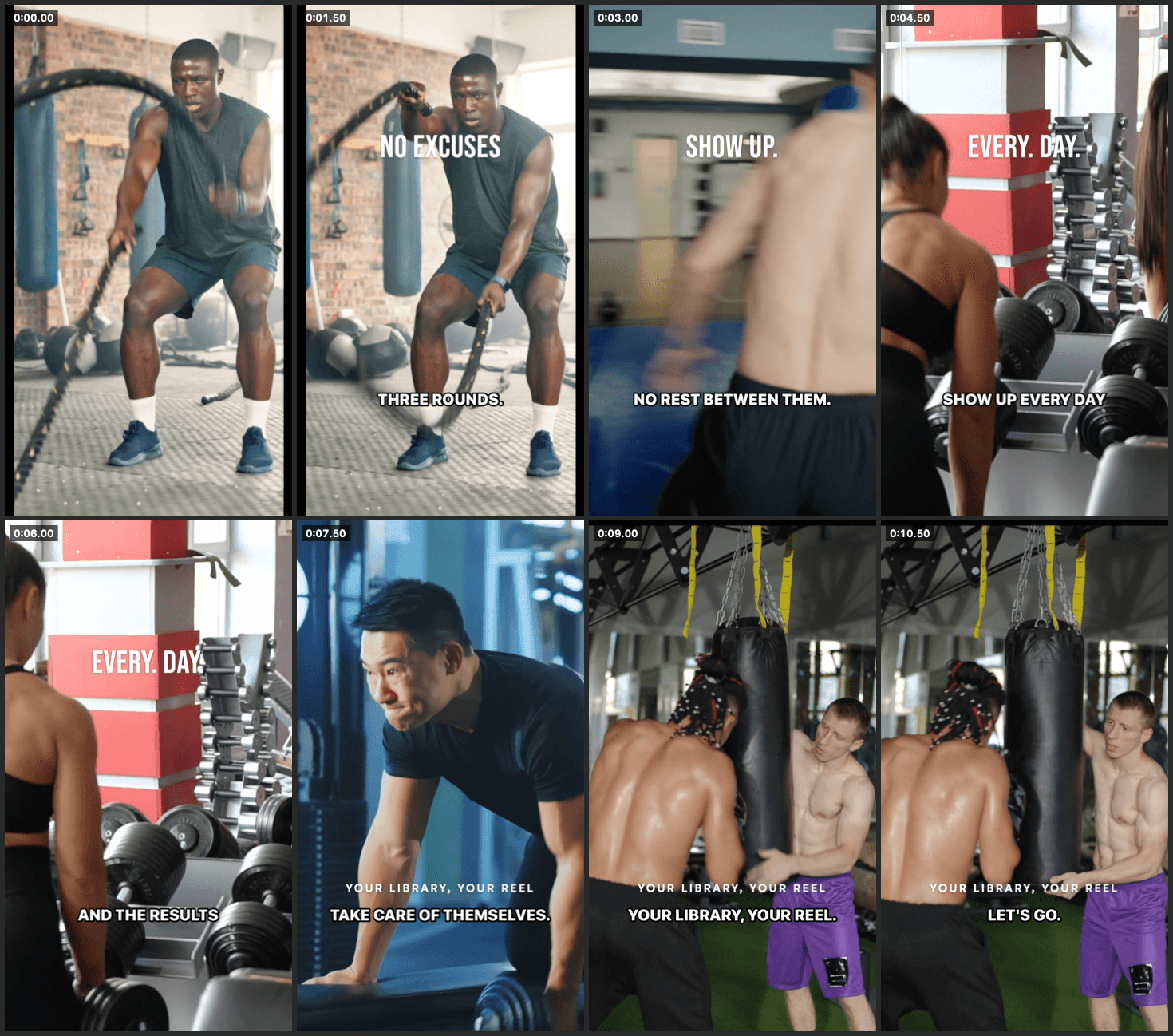
A contact sheet of eight labelled frames with the text and captions drawn on, made by BetterEdits so the model can look at the cut.

A contact sheet the app drew for the agent: one frame per clip, captions and text included. This is how the agent checks a cut.

The editor

A real editor underneath, kept small on purpose

When the agent is done, or when you'd rather do it yourself, BetterEdits is a fast Mac editor in the spirit of Instagram's Edits app. One magnetic timeline, frame-exact trims, and only the parts a short video needs.

Frame-exact trims

Drag either edge of a clip and the viewer shows the exact frame. 4K HDR footage scrubs without a spinner.

Captions you can fix by hand

The agent writes the bars from the transcript and you fix any of them inline. Eight styles with a live preview, burned in at export.

Text in 17 looks

Classic, Modern, Strong, Neon, Typewriter, Meme and more, plus every font on your Mac. Save the looks you like as favorites.

Voiceover that ducks the music

Record from the playhead while the timeline plays. Music on the other tracks drops under your voice on its own.

Export like Edits

HD, 2K or 4K at 24, 30 or 60 fps. iPhone HDR footage stays HDR all the way to the export.

Four canvases

Switch between 9:16, 16:9, 1:1 and 4:5 and your clips, text and captions stay where they were. Reels guides show what Instagram's UI will cover.
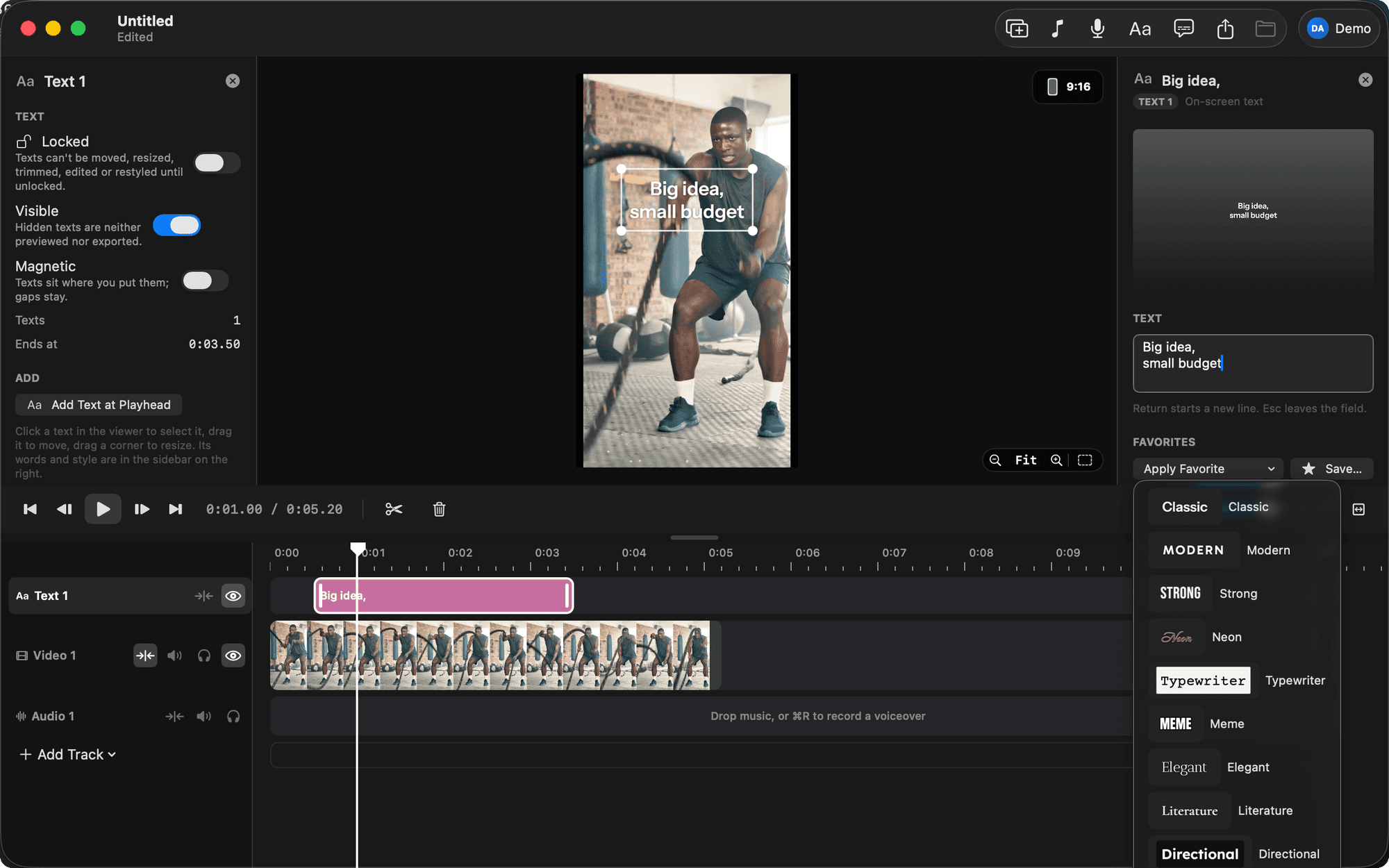
A text selected on the canvas, its inspector open, and the favorites menu showing Classic, Modern, Strong, Neon, Typewriter, Meme and more.
Not in it
  • Effects
  • Transitions
  • Keyframes
  • Colour tools
  • Speed ramps
  • Multicam
  • A plugin store
  • An account, to edit
  • Anything that makes you wait

For a long-form piece, use Final Cut. Your footage stays in folders both can read.

See every feature
FAQ

Before you download

Which agents can drive it?
Claude Code is what we build for and test with. The Claude app and Codex connect with the same Install button, and Cursor or any other agent that speaks MCP takes the same server command. There is a page for each: Claude Code, Codex, Cursor.
What is analysed footage?
An agent can't watch a video. When BetterEdits analyses a file it writes a small companion file next to it with every word, when it was said, who said it, and what is on screen. The agent reads that to cut and to caption. On Pro the app analyses everything in your workspace by itself, so the footage is ready before you ask. Footage that hasn't been analysed still plays, cuts and exports as usual. See pricing.
Do I need an agent to use it?
No. BetterEdits is a complete editor on its own: cut, caption, add text and a voiceover, export. The agent is what makes it different, and it uses the Claude, OpenAI or Cursor account you already have.
How is it different from CapCut or Edits?
It's smaller on purpose, and it takes instructions. Your footage stays in folders you own, your video is a document you can open anywhere, and an agent can edit it while you watch. Phone editors keep all of that inside one app.
Can the agent break my video?
It can do what you can do from the window, and each change is one undo away. If it sends a mistake, the app refuses it, says where the problem is, and keeps your version.
Is it free?
The editor is free: the download, every cut, caption, text and export you make by hand, every update, no sign-in. Pro lets Claude Code and other agents drive it and analyses your footage. It costs $29 a month, or $23 a month billed yearly, after a 7-day free trial.
Which Macs does it run on?
macOS 15 or later, Apple silicon. Intel Macs aren't supported.

More questions

Try it on your next video

Download the app, make a workspace, and connect your agent with one click.

BetterEdits app icon
BetterEdits for Mac
Version 0.8.0 · 15 MB · macOS 15 or later, Apple silicon
Free to edit, no account. Agents need Pro, which starts with a 7-day free trial.