
Connect an agent
Adding BetterEdits to Claude Code, the Claude app, Codex or any other MCP client, what Install writes, how each one asks for permission, and how to see that it is connected.
Agents drive BetterEdits through its MCP server, which is the app's own binary run with mcp. This page is the install guide: one window in the app adds the server to Claude Code, the Claude app or Codex with a button, and any other MCP client takes the same command by hand. Connecting is free; using the tools is part of Pro.
The window
Help › Connect an Agent… opens it; so do the Agent button in the toolbar, the link in the welcome window and the row at the foot of the account badge. It says agents need Pro first, only when this Mac does not have it, then lists one row per agent: Claude Code, the Claude app when it is installed on this Mac, and Codex. Each row shows Installed or Not installed and one Install button. Nothing is written into your folders: no guide file, no permission rule in a project, no folder to open a terminal in. The app is the context; the agent asks it which workspace and video are open.
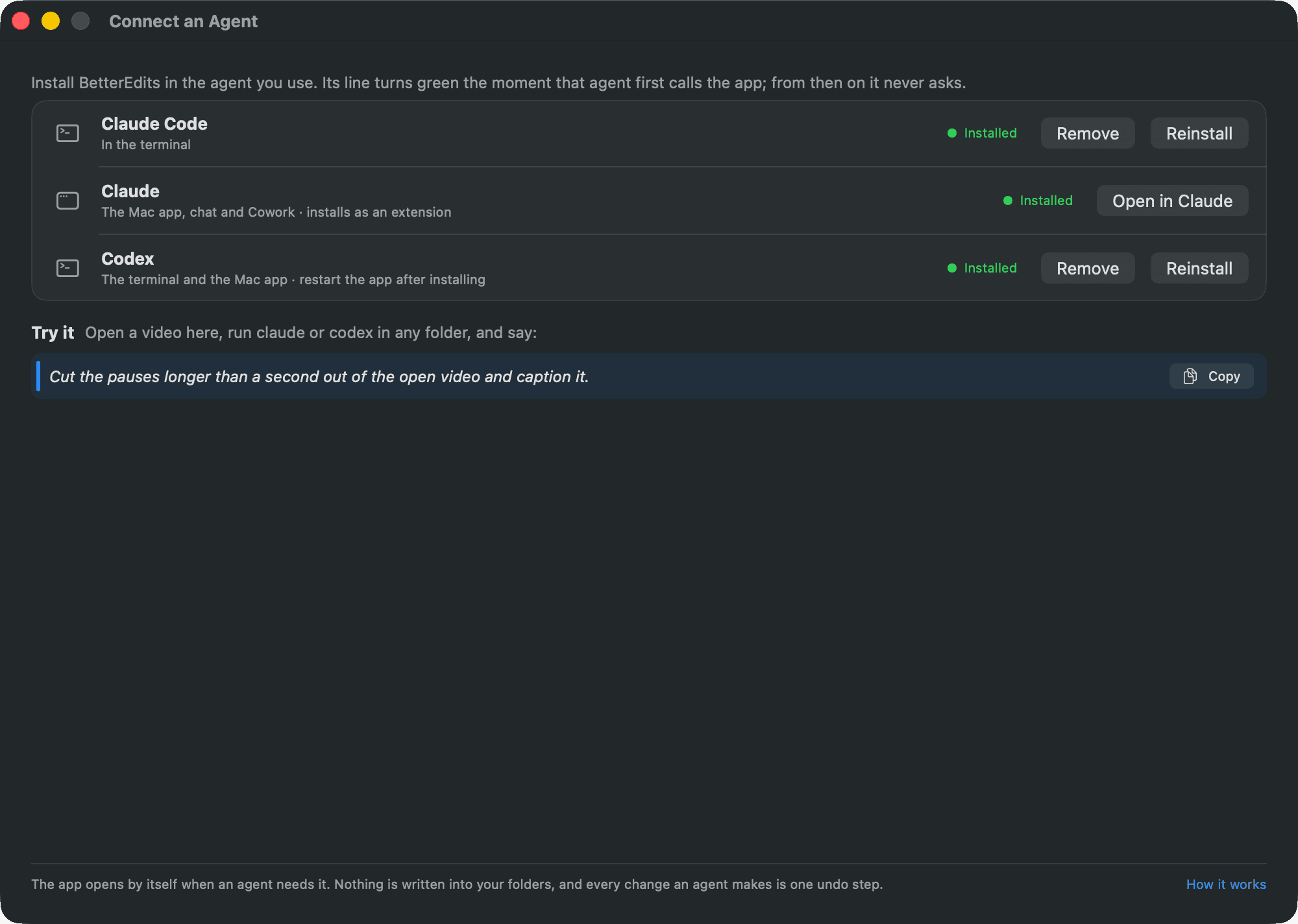
Settings › Agent integration shows the same rows and the command line's invocation with a copy button. See Settings.
Claude Code
Install registers the server for your user, so it is there in every folder, and adds a permission rule so Claude Code runs the BetterEdits tools without asking. By hand:
claude mcp add --scope user BetterEdits -- /Applications/BetterEdits.app/Contents/MacOS/BetterEdits mcp
The rule is mcp__BetterEdits in permissions.allow of ~/.claude/settings.json. Remove it if you would rather be asked per tool; every change is one undo step either way. Claude Code reads the tool list the moment it starts, without opening the editor; the app opens by itself on the first call that needs it.
Reinstall does the same again, after the app moved, say. The tools appear in Claude Code as mcp__BetterEdits__status and the rest.
The Claude app
The row appears when the Claude Mac app is installed. BetterEdits builds a desktop extension, with its icon, description, the tools and the starter prompts, and Install in Claude hands it to the Claude app, which shows its own install dialog. Once it is in, the row reads Installed and Open in Claude brings the Claude app up. Claude updates or removes the extension in its own settings.
The Claude app decides by what a tool does: a tool that only reads asks once and remembers; a tool that edits asks once per Cowork task, or once for all tasks on a personal plan. Open Connectors › BetterEdits in Claude and choose Allow all to stop the asking altogether. The starter prompts are listed under the + menu by the server's name.
Codex
One row covers the terminal and the Codex app, which share ~/.codex/config.toml. Install writes a [mcp_servers.BetterEdits] table with the command and default_tools_approval_mode = "approve", so Codex runs the tools without asking. Other servers in the file are kept. By hand, the table is:
[mcp_servers.BetterEdits]
command = "/Applications/BetterEdits.app/Contents/MacOS/BetterEdits"
args = ["mcp"]
default_tools_approval_mode = "approve"
Other MCP clients
Any client that speaks MCP over stdio takes the same server. Give it this command, with no arguments other than mcp:
"/Applications/BetterEdits.app/Contents/MacOS/BetterEdits" mcp
Cursor, for instance, takes it in ~/.cursor/mcp.json as a server named BetterEdits. Each client has its own way of asking before a tool runs; the app never sees that. The server answers tools/list from a cached table when the app is not running, so a client that starts every session with it never opens the editor.
Permissions
| Client | After Install |
|---|---|
| Claude Code | Never asks: the mcp__BetterEdits rule in your user settings |
| The Claude app | Asks once per tool that reads, once per Cowork task for a tool that edits; Allow all in Connectors stops it |
| Codex | Never asks: default_tools_approval_mode = "approve" |
| Other clients | Their own rule |
Every tool tells the client what it does: which ones only read, which ones change the video, and which ones reach the account or the analysis service. Nothing an agent does can reach a state the window cannot, and ⌘Z takes any step back.
Is it connected?
Three signs, all inside the app:
- The Agent button in the toolbar carries a grey dot until any agent has called, and a green one within a minute of a call.
- The row in Connect an Agent and in Settings › Agent integration reads Installed once the client's own record says so.
statusis the first call of every session: the agent learns which workspace and video are open, and whether this Mac has Pro.
A copy of the app that moved after Install shows as added to another copy; Reinstall fixes the path. The command line uses the same socket, so status from a terminal proves the app answers. See Command line.