
Settings
The five tabs of the Settings window, what each one holds, and where those settings live on disk.
Settings (⌘,) has five tabs: the rules that cut words into caption bars, the caption styles, the text favorites, your account, and where each agent stands. This page goes through them in order and ends with the files the first three are saved in.
Subtitles
| Setting | Range | Default |
|---|---|---|
| Max words per bar | 1 to 12 | 4 |
| Max bar duration | 1 to 8 s | 3 s |
| Split on pauses longer than | 0.2 to 2 s | 0.7 s |
The bar rules decide how the words of analysed footage are cut into bars when an agent generates subtitles. Ask it to generate a track again to cut it by new rules; that replaces its bars. See Captions.
Subtitle Styles
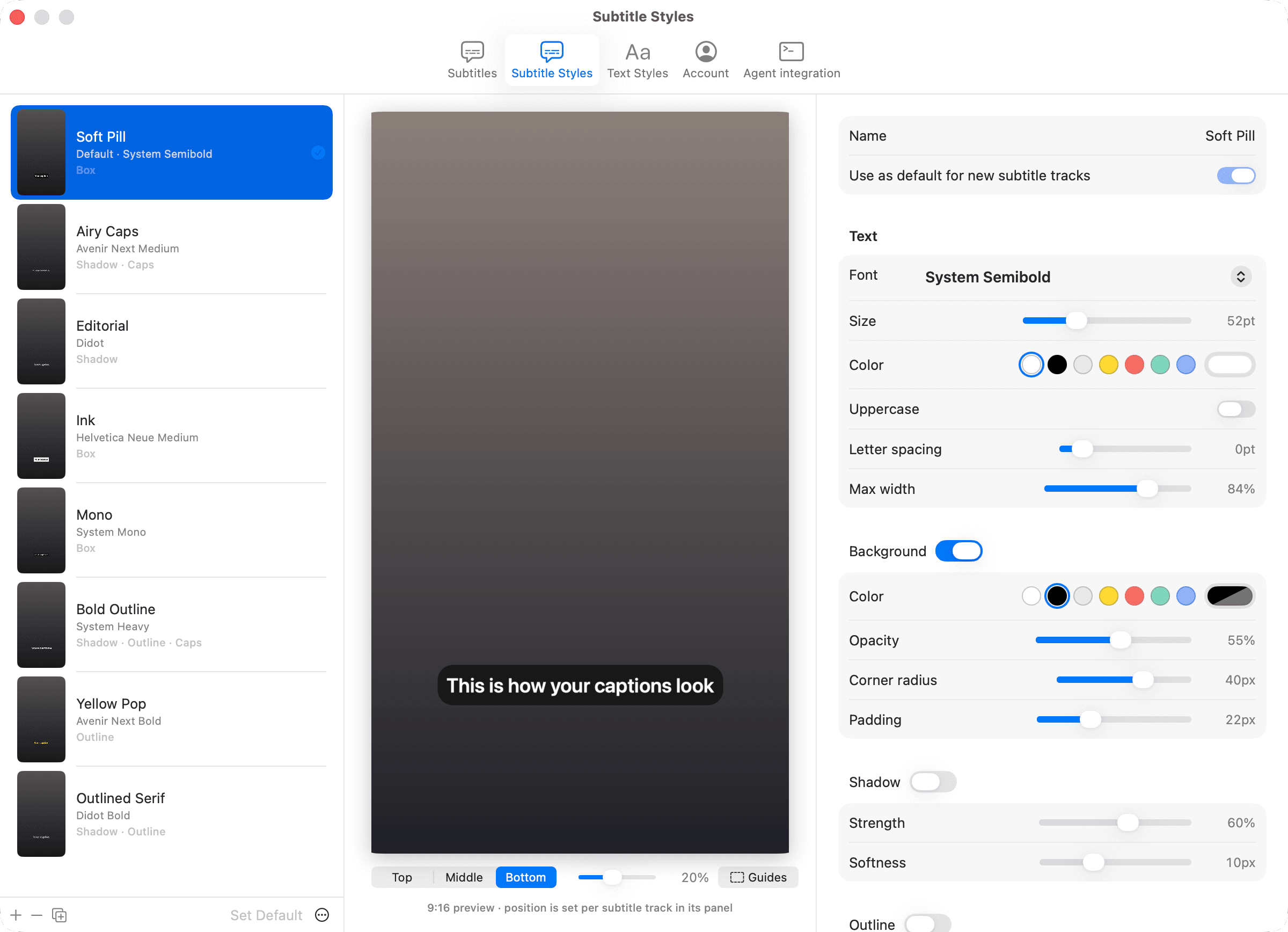
The caption styles, with a live 9:16 preview on the left and the editor on the right. The preview has its own Guides menu. Select a style in the list to edit it.
| Section | Fields |
|---|---|
| Name | The style's name and Use as default for new subtitle tracks |
| Text | Font, Size (24 to 120 pt), color, Uppercase, Letter spacing, Max width |
| Background | On or off, color, Opacity, Corner radius, Padding |
| Shadow | On or off, Strength, Softness |
| Outline | On or off, Width, color |
The buttons add a style, duplicate or delete the selected one, and Set Default; a style's right-click menu has the same. The eight built-in styles are Soft Pill, Airy Caps, Editorial, Ink, Mono, Bold Outline, Yellow Pop and Outlined Serif. Add Preset brings back one you deleted; Reset to Presets replaces the whole list with them.
A style applied to a subtitles track is copied onto the track, so editing the style here changes new tracks, not the ones already styled. See Captions.
Text Styles
The text favorites, in the same editor with sizes from 8 to 240 pt. Use for new texts marks the default, which dresses new texts. Drag to reorder; the order is the order of the Apply menu in the text sidebar. The seventeen built-in favorites are listed on Text.
Account
The account as a page: who is signed in, the plan and its prices, the credits and about how many minutes of raw footage they analyse, and this Mac's name, with the one thing to do (start the trial, subscribe, update the card, buy credits) beside Manage account and Sign out. Signed out, it offers Sign in and Start free trial. Show the welcome tour brings the tour back. See Pro.
Agent integration
Where each agent stands (Claude Code, the Claude app and Codex: Installed or Not installed), the Connect an Agent… button, and the command line's invocation with a copy button. The tab writes nothing itself. See Connect an agent and Command line.
Files on disk
The bar rules, caption styles and text favorites are saved in the open workspace as settings/captions.json, settings/caption-styles.json and settings/text-styles.json. Edits to those files are picked up while the app runs. Without a workspace they live in this Mac's preferences. See Workspaces.
Your sign-in is not in the workspace. It lives in the app's own support folder on this Mac. See Pro.