
Pro
What the Pro plan includes, the free trial, credits and what they buy, signing in, the account badge and the dashboard.
BetterEdits is free to edit by hand, forever: the download, every cut, caption, text and export, every update, no sign-in. Pro is the paid plan for agentic use. It covers the MCP server that Claude Code and other agents drive the app through, the command line with the same tools, and analysing footage, which gives an agent the words. This page explains the plan, the trial, credits, how a Mac signs in and where the account is managed. See Connect an agent for the setup and Analysing footage for what the credits pay for.
What Pro includes
| Free | Pro | |
|---|---|---|
| Editing by hand in the app, every feature, every export | Yes | Yes |
| Agents driving the app through the MCP server | Yes | |
| The command line, the same tools for scripts | Yes | |
| Analysing footage: the transcript, scenes and the rest | Yes | |
| Captions generated from the transcript | Yes |
Pro is $29 a month, or $23 a month billed yearly ($276 a year). Every month it grants 450 credits, about 150 minutes of raw footage analysed. Prices are shown with tax included.
Connecting an agent is free; using it is Pro. A tool called without Pro answers with how to sign in or start the trial, and the agent relays that. A few commands work without Pro: status, help, guide, getting-started, lint, login, logout and account. Everything else is refused until this Mac is signed in and the account is entitled.
The trial
Pro starts with a 7-day free trial that grants 90 credits, about 30 minutes of raw footage analysed. The card goes on file and nothing is charged for seven days; the plan starts at its price when the trial ends, and can be cancelled any time before that on the dashboard. A trial can also end early: Start Pro now on the dashboard charges the card today and the plan's 450 credits land at once, so a big job does not have to wait.
The trial is offered once per account: in the welcome tour on the first launch, from the account badge, in Settings › Account, and on the dashboard. See Install.
Credits
Credits count the length of the files you analyse, never what you edit or export. A file is paid for once; the result stays next to it.
| Kind of file | Credits |
|---|---|
| Video | 3 a minute of the file |
| Audio | 1 a minute |
| An image | 1 |
Credits never expire. The plan's 450 land every month; packs of 100, 300 and 1,000 credits add more, and the plan's credits cost less each than any pack. The app and the dashboard show credits and "about N minutes of raw footage analysed", never dollars of credit; dollars are prices. When an analysis needs more credits than the balance holds, the command fails with the amount it needs and the link to buy more, and the agent relays it.
Buy credits, from the badge, Settings › Account or the dashboard, opens a window inside the app with the three packs; Done closes it and the balance updates.
Sign in
Signing in exists so the app can hold a credential for the analysis service and show the account. It is a device link: the app asks for a code, opens the dashboard in your browser, and waits. You sign in or sign up there, start the trial if you have not, and the page approves this Mac. The app notices at once and the badge shows the account.
Four places start it: the welcome tour's Start free trial and Sign in, the account badge, Settings › Account, and the login command an agent runs when it needs analysis. The credential lives in the app's own settings on this Mac, never in a workspace and never in a file an agent edits. Sign out from the badge, Settings › Account, logout, or the dashboard.
The account badge
The badge sits in the project window's toolbar next to Video, and at the foot of the workspace window's sidebar: an avatar with your initial and your first name, or "Sign in". A dot appears only when something needs attention: the trial ends within three days, under three credits are left, or the subscription is past due.
Click it for the account: the email, the plan in one line ("Pro trial ends Sep 23, then $23 a month billed yearly", "Pro renews Oct 8", "Pro, past due: update your card" or "Free"), the credits and about how many minutes of raw footage they analyse, and the one thing to do as a button (Start free trial, Subscribe, Buy credits or Update card) beside Manage account and Sign out. Signed out, it offers Sign in and Start free trial.
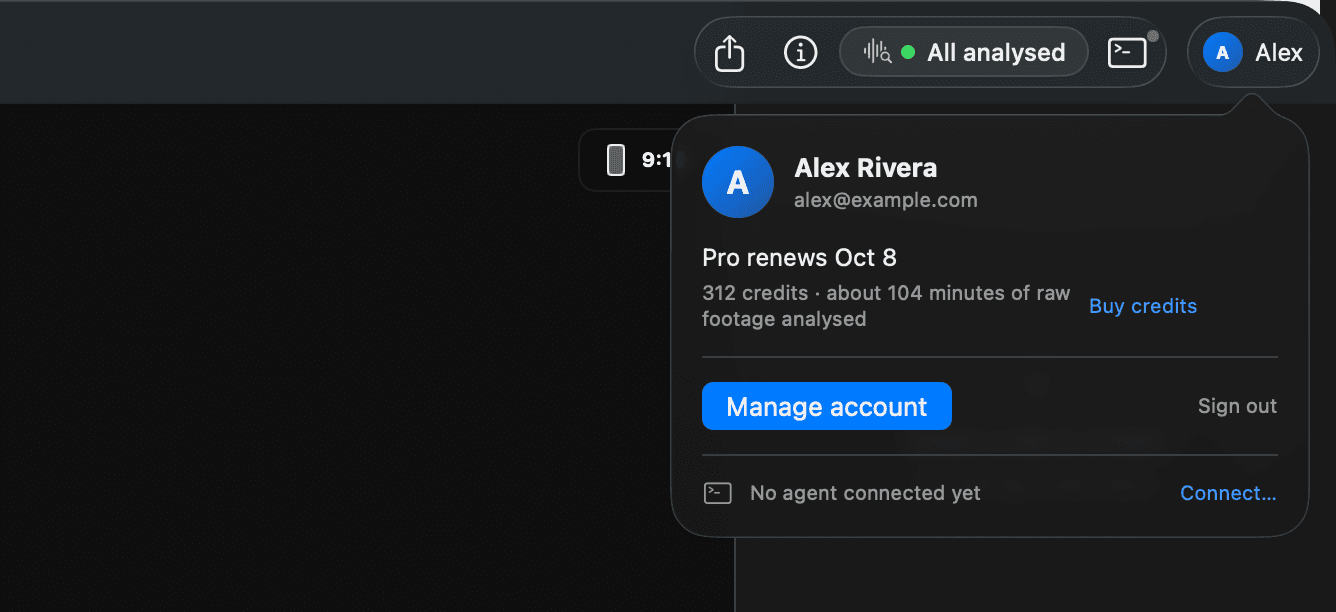
Settings › Account shows the same facts as a page, with the plan's prices and this Mac's name. See Settings.
The dashboard
Manage account opens the dashboard in your browser. It holds the plan (start the trial, subscribe, switch between monthly and yearly, update the card, cancel), the credits as a balance with a statement of every grant and every analysis, Buy credits, and the linked Macs, each with its name and a Sign out. Signing a Mac out there takes effect the next time the app checks, within a minute.
Cancelling runs the plan to the end of the period paid for; the credits stay yours.